
Get Started
Complete your first Finterion developer workflow
Move through the complete Finterion developer lifecycle: create an algorithm, upload source and research, promote a release, and configure a deployment.
1
Set up developer access
- Create a developer account or add developer access to your existing account.
- Open the Developer Dashboard and create your first organization.
2
Create your first algorithm
- Open your organization and select Algorithms.
- Choose New Algorithm and enter its name, description, and initial settings.
- Create the algorithm to open its workspace.
3
Upload your first algorithm
Select the strategy framework first, then choose the Finterion tool you want to use for validation and upload.
Framework
Finterion developer tool
Validate and push from your terminal
Run local validation, then push the current IAF project to register an immutable source version.
Shell
cd my-strategy
finterion validate
finterion push
4
Upload your first backtest bundle
Upload an OBT result with the Python SDK or CLI and link it to your algorithm.
Upload research from Python
Use the SDK from a notebook, research script, or Python automation.
Shell
pip install finterion
Python
from finterion import upload_backtests

upload_backtests(
    "./my-backtest.obtf",
    organization="My Organization",
    name="First research bundle",
)5
Create your first release
- Open the algorithm and select Releases.
- Choose New release and select the validated source version.
- Add a release name and notes, then keep visibility Internal while validating.
- Create and validate the release before using it in a deployment.
6
Create your first deployment
- Open the algorithm and select Deployment.
- Choose the validated release and configure its preset, parameters, market, and schedule.
- Create the organization deployment and review its status before allocating capital.
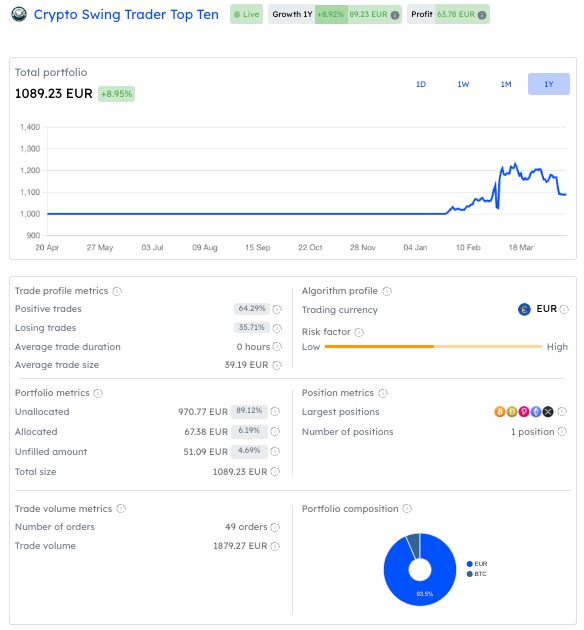
Once research or deployment results are available, inspect performance, risk, and trade-level metrics in Finterion.
What you accomplished
You now have a developer organization, an algorithm with validated source and research, a release, and a deployment configuration. The SDK, CLI, and Developer Dashboard all operate on these same resources.